The Links 2003 Assistant 2.0 Manual
Changes From Version 1.7
1. The course database function has been removed. I was unhappy with the course database function because it was too simplistic and did not meet my more complex needs for a course database. Instead of rewriting the code to suit my needs, the function has been removed.
2. The Virtual Tournament is back in this version. I have retooled some of the code, and I am very happy with how the computer player scoring performs.
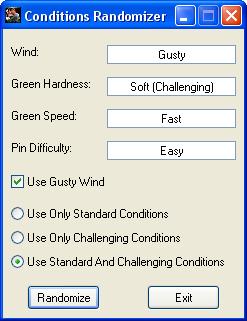
3. The Course Randomizer has been replaced with the Conditions Randomizer and now has all of the conditions available in Links 2003 1.07. The Conditions Randomizer now has support for (optional) gusty wind, and you can choose between Only Standard Conditions, Only Challenging Conditions, or Both Standard And Challenging Conditions.
Virtual Tournament
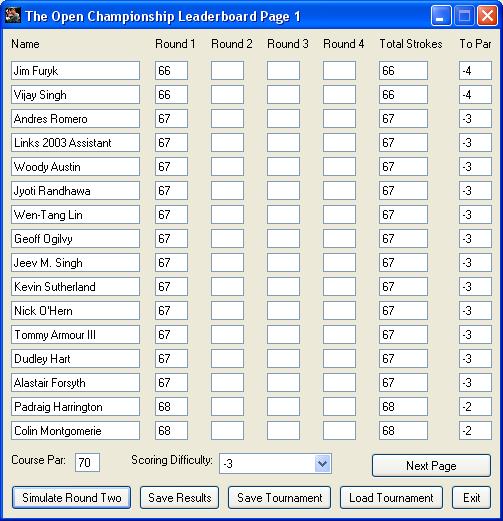
The Virtual Tournament lets you play an offline tournament against computer players. Click here to see a screenshot of the main VT window. Here is some information about the VT and its limitations:
1. The VT only supports 128 players. That allows for one human player and 127 computer players.
2. There are 2 files that contain information about the computer players. AVG.DAT controls how well computer players will perform versus the selected scoring difficulty. The default AVG.DAT is arranged as so: The number one player in the world is set to -4. Players 2-10 are set to -3. Players 11-25 are set to -2. Players 26-127 are set to -1. This arrangement gives every player a chance to win the tournament, but increases the likelihood that the better players will be at the top of the leaderboard. You can edit the AVG.DAT file to modify these values and get different results. The PLAYERS.DAT file stores the player names. I have included the top 127 players in the world as they stood prior to the 2008 Open Championship. These names can replaced or changed, but only 127 players can be in the list.
3. The key to using the VT is knowing what to set the scoring difficulty to after your round. You have to use your imagination to determine how well you think you played versus the field. If you set the scoring difficulty to the same score that you shoot in every round, you will win the tournament or come close to winning every time. I would recommend setting the scoring difficulty to the same score that you shot, or 1 or 2 strokes worse or better depending on how well you think you played. It's easy to simulate some tournaments and enter fictional scores to get a feel for how the scoring works.
4. The VT only supports stroke play tournaments.
5. The VT does not have a playoff system. If there is a tie after 4 rounds, you will receive a message saying that you must play a playoff to determine the winner. When there is a tie, I recommend to create a new tournament and use that to play an 18 hole playoff. You can simulate just one round and compare your score against the player or players that you were tied with to determine the winner.
6. The VT allows you to change the course par in between rounds. This allows you to play a single tournament on multiple courses.
7. The Save Tournament and Load Tournament functions allow you to save your tournament in progress so that you can resume it at a later time. You do not need to specify a file extension, only a file name. Saved tournaments are saved in the "saves" directory.
8. The Save Results function allows you to save the results of your tournament. You should specify a TXT file extension so that you can double click the results files to open them in Notepad (e.g. "Open Championship 2008.txt"). Tournament results files are saved in the "tourneys" directory". Click here to see an example of a tournament results file.
9. Only the top 64 players will make the cut. Players who are tied with the cut line will miss the cut if they are listed below the 64th position on the leaderboard.
Conditions Randomizer
The Conditions Randomizer will give you a set of random course conditions to play in. It supports all of the conditions that are available in Links 2003 1.07. You can choose to use or not use Gusty Wind, and for the green conditions you can choose between Only Standard Conditions, Only Challenging conditions, or Both Standard And Challenging Conditions. Click here to see a screenshot of the Conditions Randomizer.
Questions? Comments? Suggestions?
If you have any questions, comments, or suggestions about The Links 2003
Assistant, please email me at
pfdogs@gmail.com.